
Frequently asked questions
AnswersAi is an AI-powered educational platform dedicated to empowering students with comprehensive learning resources. Our platform provides not only instant AI-generated answers but also summarized notes, detailed explanations, and targeted quizzes to help students excel in their areas of interest.
We are committed to personalizing education worldwide through an LMS-integrated ecosystem that includes features like Snapsolve and Lecture Mode. Our AI-powered solutions are accessible via both mobile apps (iOS and Android) and a browser extension, enhancing learning and providing instant homework assistance anytime, anywhere.
AnswersAi provides quick and instant solutions to your questions. It is available as a Mobile App (App/ Play Store) as well as a Browser Extension. You can snap a photo of a question to receive an immediate answer. Our Lecture Mode also offers instant notes and summaries. With just one picture or screenshot, you can get fast solutions.
You can do this easily by following these steps on your PC:
- Go to AnswersAi.
- Log in to your existing account.
- Click on Manage Account at the top right corner.
- Select View Account.
- You will see an option to update or cancel your subscription—click on Cancel Subscription.
- Once canceled, you’ll receive a confirmation email.
Once installed, the extension should appear as an icon next to your browser’s address bar. If you don’t see it:
- Click on the puzzle icon in the top-right corner of Chrome.
- Find ANSWERSAI and click the pin icon to make it visible in the toolbar.
AnswersAi is available as both a mobile app and a Chrome extension. You can download the mobile app from the Google Play Store or the Apple App Store, and install the extension from the Chrome Web Store.
AnswersAi does not use traditional passwords. Instead, you can sign in using verification codes sent to your email or phone number.
If you’re not receiving your verification code:
- Check your spam or junk folder for email codes.
- Ensure you have a stable network connection for SMS codes.
- Verify that you entered the correct email address or phone number.
Currently, AnswersAi is designed to work specifically with Google Chrome. However, you can also use the AnswersAi mobile app, available on both iOS and Android.
According to our Terms of Use, we do not provide refunds on subscriptions under normal circumstances. You can review these terms in the “Terms of Use” section on our website.
However, you may cancel your subscription at any time to prevent future charges, and the cancellation will take effect at the start of your next billing cycle.
To request a refund, please email us at support@answersai.ai with your account details and a brief description of the issue.
AnswersAi is a paid application. However, we offer the first five questions for free on the mobile app so you can explore our features and evaluate the service before subscribing.
Our monthly plan costs $12.99 per month, while our yearly plan is $39.99 (equivalent to $3.33 per month), billed annually in a single payment.
To view our pricing details, please visit: https://answersai.com/pricing
Please email us at support@answers.ai with the following details for verification purposes:
- Your full name
- The registered email ID associated with your subscription
- Your device type (e.g., iPhone, Android, PC)
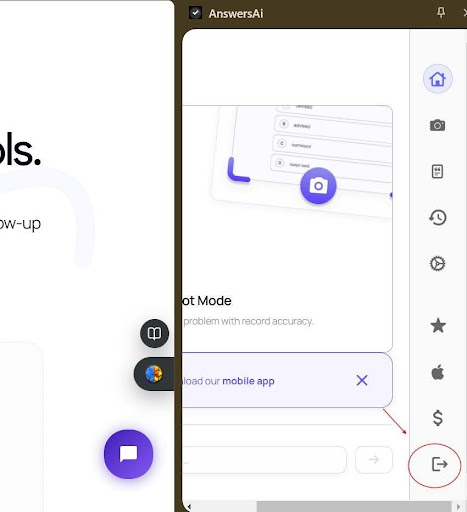
To log out of the extension, please follow these steps:
- Locate the extension icon in your browser’s toolbar.
- Click the icon to open the extension popup.
- Find the Logout button in the popup window.
- Click Logout to sign out.
AnswersAi strictly prohibits any use that constitutes academic dishonesty.
While the app does not notify any third parties about its use, it is your responsibility to ensure that the service is used ethically and in accordance with all applicable rules and guidelines.
To uninstall the extension:
- Open Chrome and click on the three dots in the upper-right corner.
- Navigate to More Tools > Extensions.
- Find ANSWERSAI and click Remove.
If AnswersAi is stuck on loading, try the following steps:
- Refresh the page.
- Clear your browser’s cache and cookies.
- Restart Chrome, or try using the mobile app.
Our AI features support over 80 languages worldwide.
However, it works best when used in English. To use it in your desired language, simply provide the prompt in the same language, and the system will process it accordingly.